FAQ

MacOS

Developer cannot be verified or app is damaged

Starting from macOS 10.12, apps not from the Mac App Store are restricted.

alt text alt text

Cause: Because the app is unsigned, you may see messages such as "developer cannot be verified" or "app is damaged." The developer needs an Apple Developer Program membership for code signing. Solution:

  • Click "Cancel", then go to "System Preferences" -> "Security & Privacy".
  • Click "Open Anyway", then click "Open" in the popup window.
  • On newer system versions, you may not find the above options on the "Security & Privacy" page, or you may see a file-damaged warning on launch. Open Terminal and run the command below to grant permission.
sudo xattr -d com.apple.quarantine /Applications/Cxxxx.app

Apple cannot check the app for malicious software

Apple cannot check whether this app contains malicious software.

alt text

Solution:

  • See the macOS User Guide and choose the document for your macOS version. alt text

Windows

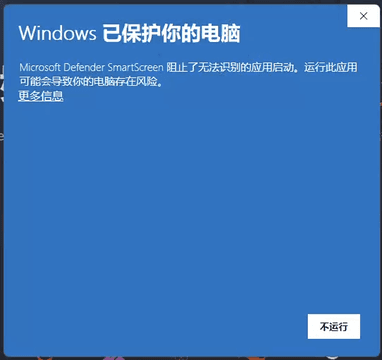
This app can’t run on your PC

alt text

Cause: Not signed.

Solution: Click "", then click "", and follow the prompts to continue installation.

Cannot launch / no UI / crashes / tray icon only

Cause: The Tauri framework depends on WebView2. If WebView2 is uninstalled or disabled, the UI cannot be displayed. Typical behavior: the app starts, but clicking tray menu items does nothing.

Solution:

  • If Edge was disabled by third-party software, check whether WebView2 was also disabled and re-enable WebView2.
  • If WebView2 was uninstalled, download the WebView2 installer and reinstall it.
  • If the issue still exists, try launching the app in Windows 7 compatibility mode.

WebView2 cannot be installed properly

Cause: Windows automatic updates may be turned off.

Solution:

  • Enable automatic updates.